 . The screen below will be shown.
1) To add
a Room Type Comment click on the Add Room Type Comment button . The screen below will be shown.
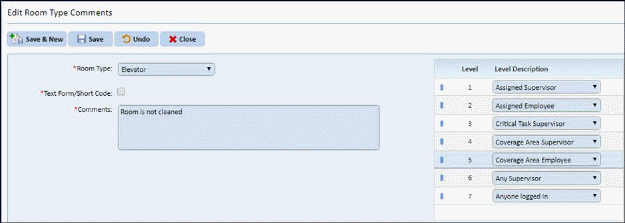
2) Select the Room Type that you would like to add a comment to using the Room Type drop down.
3) Decide if this is to be a free text comment by the requestor or if a short code is to be used? If so, please check the box to the right. Note: You can only select either a free text comment/short code OR a predefined comment.
4) If entering a predefined comment, type it in the Comments box provided.
5) Click the Save button  to save
your selection.
to save
your selection.
6) Repeat steps 1 through 4 for all other room type
comments you wish to add. When finished you may use the close button
 to return to the Room Type Level Settings
screen.
to return to the Room Type Level Settings
screen.