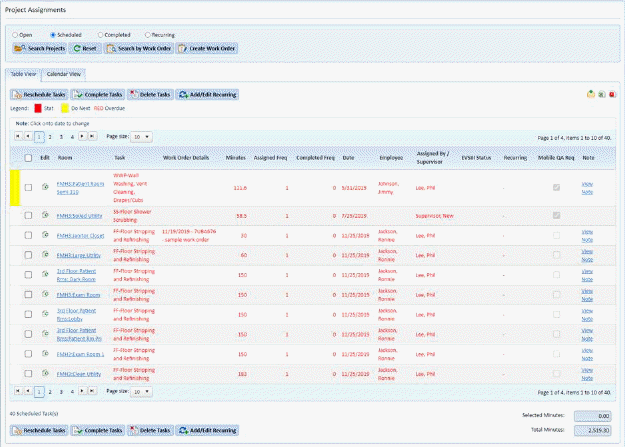
The Project Assignments Module also reflects changes implemented with ES Service Optimizer. In this module, users (supervisors) can track projects employees perform more effectively as they can learn in real time the status of project work. Only projects that are assigned to individuals who are flagged as EVS Tech III would receive project related tasks in ES Service Optimizer for Employees.
Supervisors can inspect completed project work. Supervisors can also control priority of projects. This helps specify project scheduling.
Project colored Yellow in left column are “Do Next”, Red are “Stat”. If the project text itself is red as seen in all entries above they are overdue (past the scheduled date) and are ready to be rescheduled.
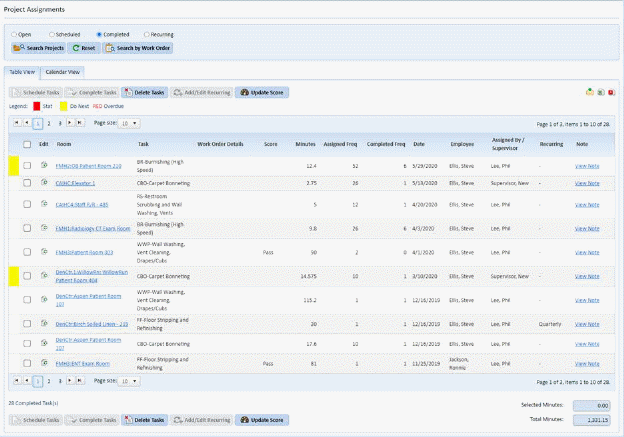
In the completed view project Inspection can be
review/update or completed. Simply select the project you wish to work
with by selecting it using the box to the left of the project as shown at
right:  Next you will use the
Update Score
Next you will use the
Update Score  button to view the Update
Score dialogue as shown below:
button to view the Update
Score dialogue as shown below:
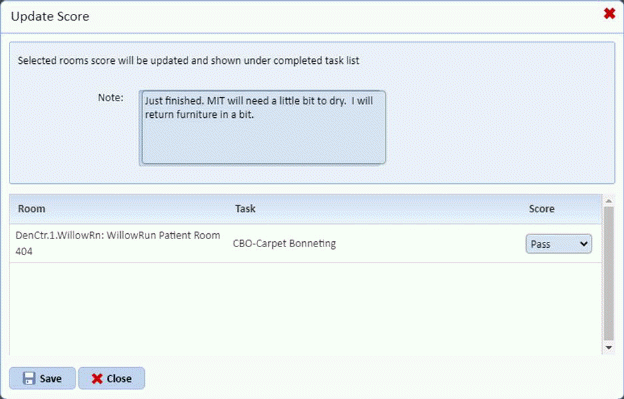
You may enter a note in the top note field, and can select
either Pass or Fail as a result of your review. Finalize your entry by
using the save  button. If you
wish to leave the dialogue without changing anything use the close button
button. If you
wish to leave the dialogue without changing anything use the close button  .
.
Note: Supervisors can view recently completed projects and score them remotely within ES Optimizer Mobile – Service Optimizer module.