This feature is available beginning with ES Service Optimizer Tech Mobile v2.6.4
The “Debug Mode” feature allows Clearing All Users Data, Uploading Logs, and Resetting All Data from within Debug Mode within the IOS Settings menu.
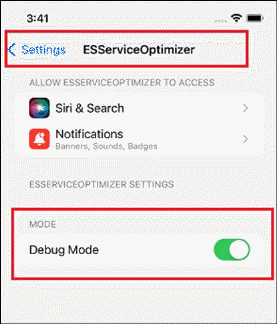
- Added a “Debug Mode” option in device setting Settings >> ES Service Optimizer, refer to screenshot below:
- If “Debug Mode” option is on (green) and user opens the ES Service Optimizer app, the user is redirected to following screen (before login screen).

Note – When debug mode is on, app should be Opened to view the debug mode screen.
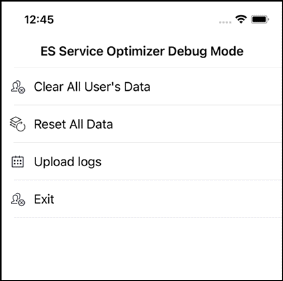
- User can Clear All Users Data, Reset All Data and Upload Logs
Please Contact Technical Support at 1-800-260-8665 Option #2 or email Tech@smartFacilitySoftware.com for the Password required as shown below:
- A Password is required for each operation: (Please Contact Technical Support by phone if at all possible, so we can walk you through the operations correctly and provided the needed passwords).
-