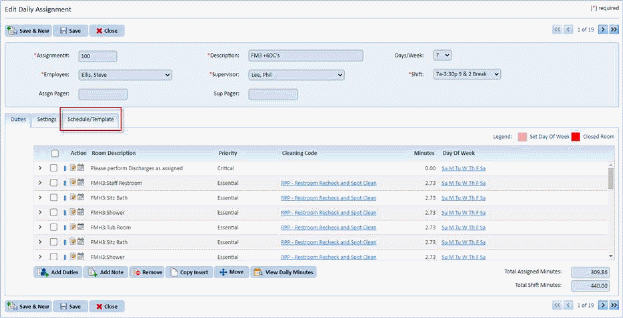
A Days Off Roster must be set up so that you can control your hours effectively. ES Optimizer makes the management of this tedious task much easier. With the addition of the Schedule/Template tab in the Daily Assignments Module, users can now easily track who does what assignment on a day to day basis.
The Schedule/Template tab in the Daily Assignments module also show a much deeper integration between the Daily Assignments module and the Personnel module, much more so than the previous versions of ES Optimizer.
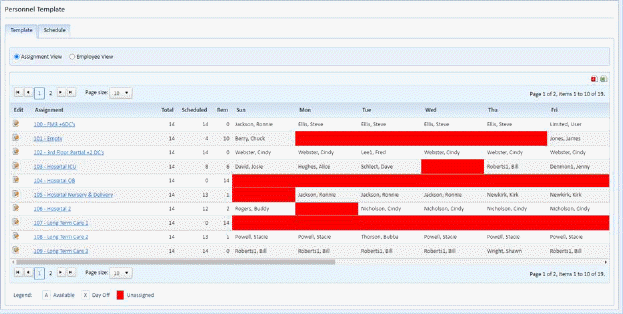
NOTE: If it is not clear enough, it should be stated that changes in the Schedule/Template tab in the Daily Assignments module affect the Personnel Template tab in the Personnel module. You will Notice editing the Template Tab by assignment takes you directly to the Daily Assignment Schedule/Template Tab.
Below is the procedure to make changes in the Schedule/Template tab:
1. Select
the assignment with the schedule template you wish to update using the  button or click on assignment name..
2. Ensure that the day in question is active:

3. Specify the employee working that assignment for a selected day of the week:
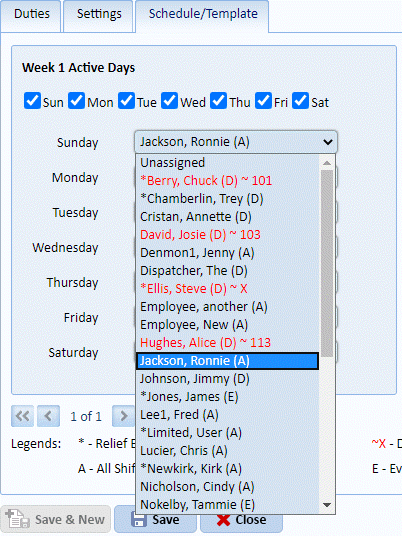
In this case, Sunday with Ronnie Jackson, can be changed to another employee.
4. Repeat the step 2 for all other days you want to update.
5. Click
on the Save button to save the
changes. To cancel, click on the Undo button
to save the
changes. To cancel, click on the Undo button .
.
6. Repeat steps 1 through 5 for all other assignments you want to update.