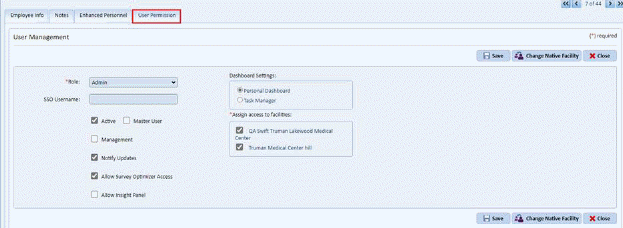
1. Add/Edit Employee -
- If SSO exclusive is enabled then, User Permission tab is shown in employee details page (Add/Edit Employee).
- Master user can add user details while creating a new employee or editing existing employee.
- The tab is only accessible for Master user and available when SSO Exclusive is enabled.
- Users can edit additional setting from User module.
- When the new user is added from User Permission, the password set for the user is “F$_2024SsO!$La”.
2. Add/Edit User -
- If SSO exclusive is enabled, then Password/ Change password/ Reset Password is not visible to the user.
- When the new user is added from Add/edit User and SSO Exclusive is enabled for the account, the password set for the user is “F$_2024SsO!$La”.
