 . You will
see this screen:
. You will
see this screen:This function of Mass Update allows the user to control rooms/duties that have been either over or under assigned depending in the assignment they are located. The user can specify what days of the week duties can be done.
To update the duties frequency and what days of the week such duties can be performed, perform the following steps:
1. You
may choose the assignment you wish to modify by using the Select Assignments to
make changes to button . You will
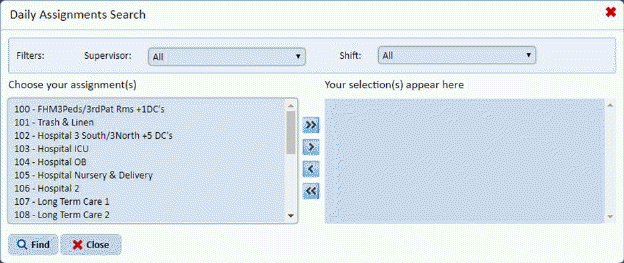
see this screen:
2. You
can filter and/or select assignments and use the arrow buttons  to move assignment(s) to the selection
box as you wish. When you are finished use the Find button
to move assignment(s) to the selection
box as you wish. When you are finished use the Find button to complete your selection you will see the
screen below:
to complete your selection you will see the
screen below:
3. Click
on the Edit Frequency button  under
the Action column for the Assignment you wish to review/update. This will
open the figure below:
under
the Action column for the Assignment you wish to review/update. This will
open the figure below:
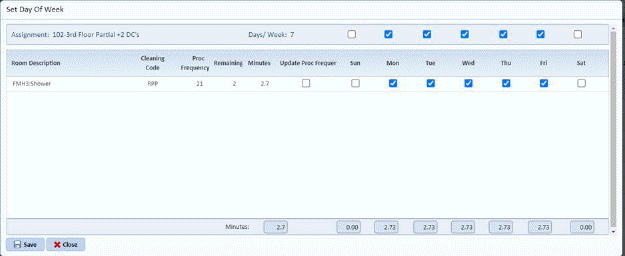
4. For the example above, notice the rooms have a frequency of 5 (by the check boxes). The rooms are, therefore, under scheduled for the assignment which is set for 7. The user has a choice of updating the frequency of the room or specifying which day of the week the room will be cleaned in the assignment. Click on the checkbox that fits your needs.
5. Click
on the Save button  to execute the
changes.
to execute the
changes.
6. Click
the Close button  to close this
assignment and move to the another assignment.
to close this
assignment and move to the another assignment.