 . You will
see this screen:
. You will
see this screen:This function of Mass Update allows the user to rename and re-organize assignments without having the user go through each assignment for every change in name/description or assignment number.
To update the Assignment Number/ Description of Assignments, perform the following steps:
1. You
may choose the assignment you wish to modify by using the Select Assignments to
make changes to button . You will
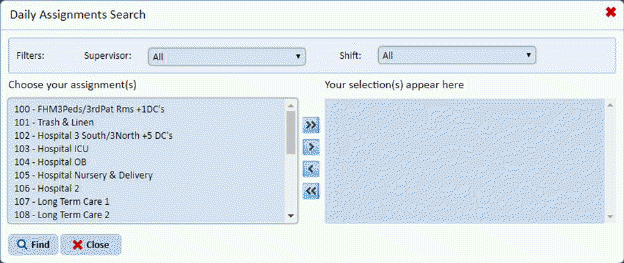
see this screen:
2. You
can filter and/or select assignments and use the arrow buttons  to move assignment(s) to the selection
box as you wish. When you are finished use the Find button
to move assignment(s) to the selection
box as you wish. When you are finished use the Find button to complete your selection.
3. Select the Assignment(s) you wish to update by placing a check mark in the box to the left of the Assignment number.
4. Edit the Assignment Number and/or Description. Please note that Assignment Numbers must be unique.
5. Click on the Update
button  to update the
assignments.
to update the
assignments.