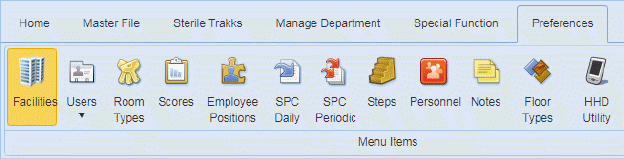
The settings involving Faults Management can be found in the Facility Module in the Preferences Tab:
By clicking on the Facilities button  and opening the Facility record you wish
to update, you can view the figure below:
and opening the Facility record you wish
to update, you can view the figure below:
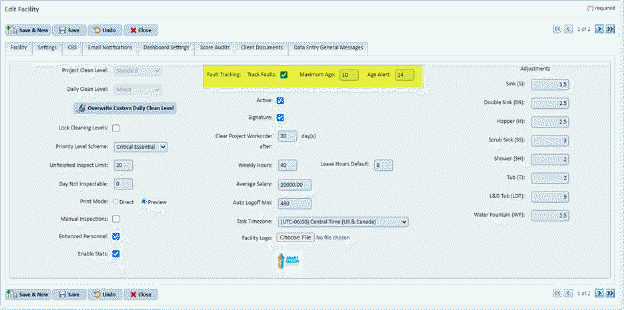
The highlighted fields need to be reviewed:
Fault Tracking  - This is a collection of fields covering
the tracking of faults or deficiencies when performing inspections. Users
can turn on fault tracking with the Track Faults check box, specify how long
faults are held in the system (Maximum Age – in days), and alert users if a
fault reaches a certain age (Age Alert – in days).
- This is a collection of fields covering
the tracking of faults or deficiencies when performing inspections. Users
can turn on fault tracking with the Track Faults check box, specify how long
faults are held in the system (Maximum Age – in days), and alert users if a
fault reaches a certain age (Age Alert – in days).
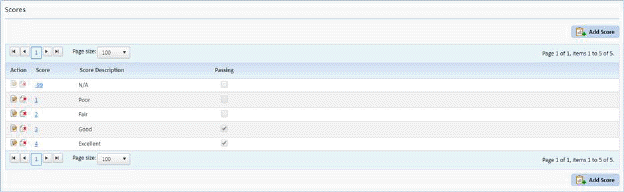
The other part of the Fault Tracking system is the scores. Go to Preferences >> Scores. See figure below:
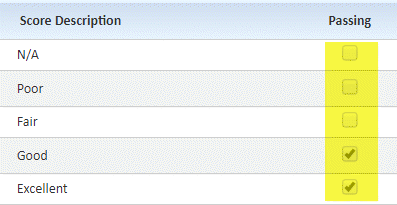 It is important
to have set up the scores to either pass or not. Otherwise, there will be
no faults if the scores don’t reflect the performance of the employee.
It is important
to have set up the scores to either pass or not. Otherwise, there will be
no faults if the scores don’t reflect the performance of the employee.