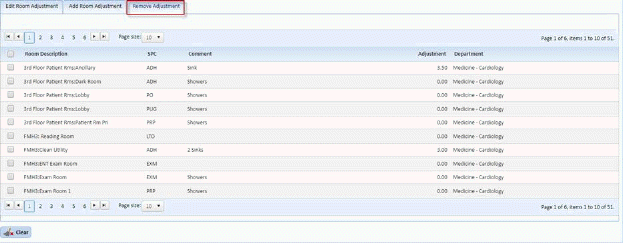
1. Open the Mass Update Tool – Update Room Assignments
2. Select the “Add Room Adjustment” Tab as shown below:
3. Search
for the rooms you wish to update by using the Select Room to make changes to
button .
.
4. Enter the search criteria as desired into the Room Search box as shown below:
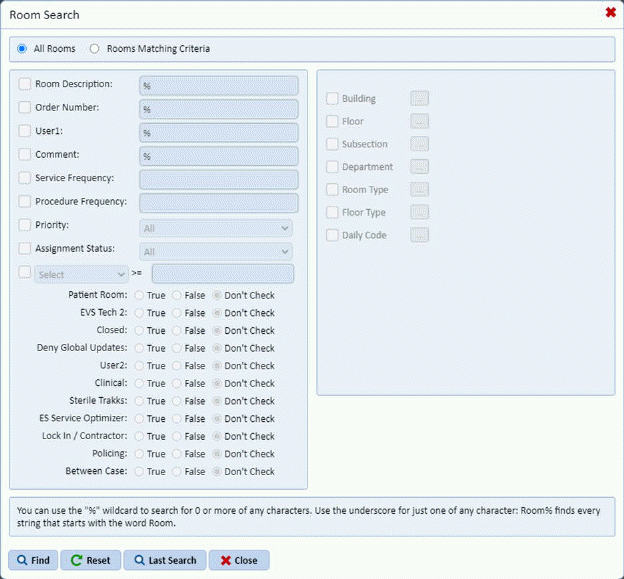
5. Click
on the Find button  to apply the
search options to the Remove Adjustment box.
to apply the
search options to the Remove Adjustment box.
6. Select the room(s) you wish to remove the comment and adjustment from by placing a check mark to the left of the room description as shown below:
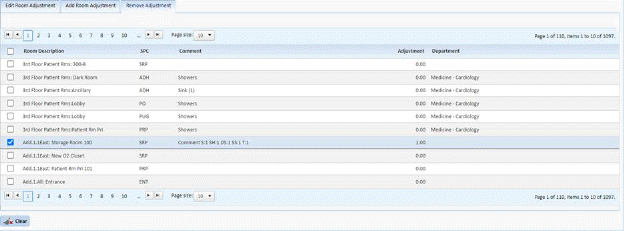
7. Click
on the Clear button  to remove the
adjustment.
to remove the
adjustment.
8. Repeat Steps one through four for all rooms you wish to Room Adjustment.
NOTE: The comment (if any) will remain should the adjustment need to be re-applied.