The Mobile Settings button  opens the Mobile settings menu which
includes two tabs. The “Settings” Tab and the “User Status” Tab.
Both work with the ES Service Optimizer Mobile and the Mobile app
functions.
opens the Mobile settings menu which
includes two tabs. The “Settings” Tab and the “User Status” Tab.
Both work with the ES Service Optimizer Mobile and the Mobile app
functions.
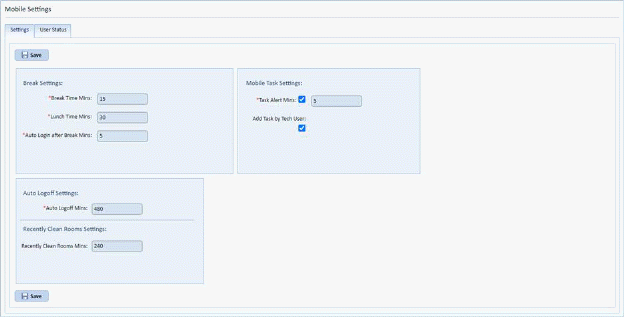
Settings – Break Settings – defines the default time for breaks and the auto login time following a break.
Mobile Task Settings – defines the length of Task Alert Mins – This is the amount of time before the user is alerted to a new task. Add Task by Tech user – allows mobile user to add tasks themselves via the Service Optimizer mobile application.
Auto Logoff Settings –In Progress Auto Complete Mins – If the user starts a room and does not log the room is complete it will automatically complete the room after the entered number of minutes.
Recently Clean Rooms Settings –The “Recently Clean Rooms Mins:” field allows for the timer (in number of minutes) a room will be considered recently cleaned.
The “User Status” Tab will display the status of users by name including the app they are logged into, Idle time (in mins) and the; last activity date as shown below:
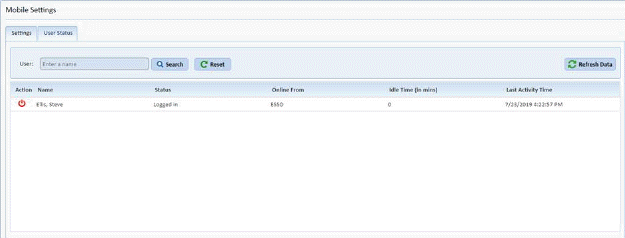
The power button  permits logging a user off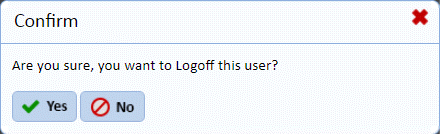
If their status has not updated properly