 while in patient rooms allows the
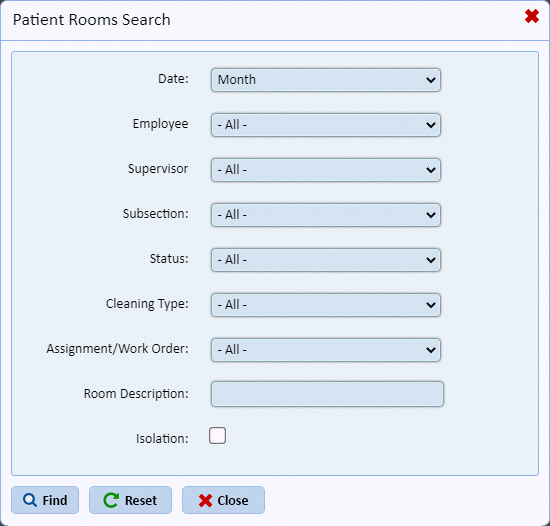
selection of various criteria as shown below:
while in patient rooms allows the
selection of various criteria as shown below:The Patient Rooms Tab is like the History Tab but the focus is on patient rooms. Because of the nature of patient rooms, employees can perform routine cleaning or discharges in patient rooms. There is also bed count involved as patient rooms can be private, semi private or wards. The ES Technician can also tag beds as vacant when cleaning the patient room.
By using the Find button while in patient rooms allows the
selection of various criteria as shown below:
Using the Reset  button returns your results to all [Today].
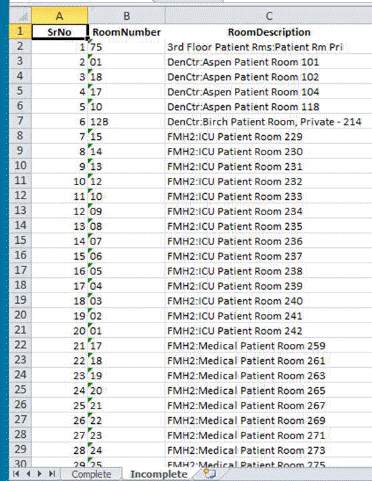
The Complete/Incomplete Rooms button  exports to excel a list of all complete
and all incomplete rooms an excerpt is provided below:
exports to excel a list of all complete
and all incomplete rooms an excerpt is provided below:
The Rooms Not Cleaned Today button  provides a means to filter and show the
rooms that were not cleaned today as shown below:
provides a means to filter and show the
rooms that were not cleaned today as shown below:
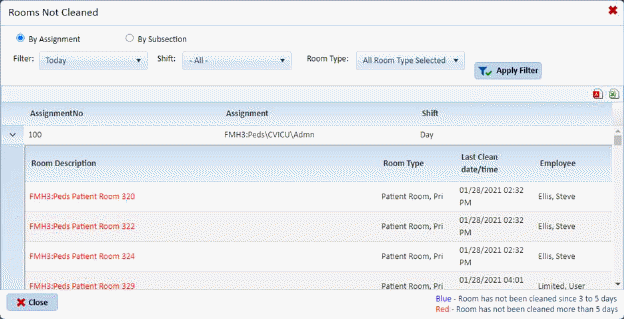
As you can see the rooms can be filtered by: Assignment or
By subsection then [Today, Yesterday, Custom date range] By Shift, and by one or
more room types as selected then use the Apply Filter button  to see the result.
Room descriptions in blue have not been cleaned in 3-5
days; rooms in red have not been cleaned in mover 5 days. You may export
this list to .pdf or excel using the export buttons  .
.