 . See example below:
Below is the procedure to move notes/duties within the same assignment:
1. In the Daily Assignments List, select the assignment you want to edit.
2. After
finding the assignment, select the note(s) and/or duty (duties) you want to
move. A note/duty is selected by clicking on checkbox . See example below:
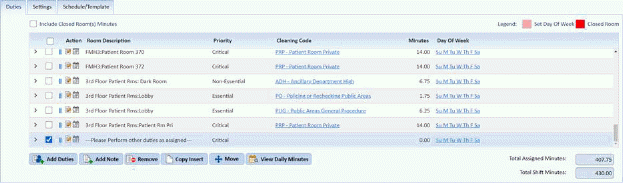
Notice that the bottom note was selected.
3. Using
the mouse, ensure that the mouse pointer is pointing to the mouse handles  next to the checkbox for a
duty/note. The mouse pointer will turn into a hand pointer
next to the checkbox for a
duty/note. The mouse pointer will turn into a hand pointer  if the user is pointing in the proper
spot
if the user is pointing in the proper
spot
4. You can use the mouse to drag and drop the duty/note up or down the list of duties/notes.
5. If you
are satisfied with the changes you have made to your assignment/route, click on
the Save button . To cancel, click
on the Undo button
. To cancel, click
on the Undo button .
.
6. Repeat steps 2 through 5 for all other duties/notes you want to move in the assignment.