 to open the
Personnel Tab List.
to open the
Personnel Tab List.Below is the process of modifying existing days off known as a Leave Code:
1. Click
on the Personnel button to open the
Personnel Tab List.
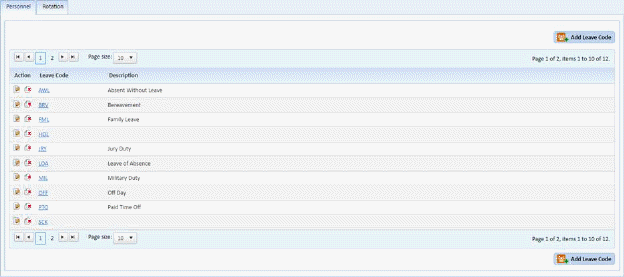
2. Select the Day Off you want to update
3. Click
on the Edit button  before the leave
code or on the leave code itself. You will be routed to the form
below:
before the leave
code or on the leave code itself. You will be routed to the form
below:
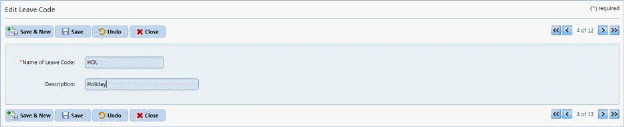
4. Update the Name of Leave Code field and/or the Description field.
5. If you
are satisfied with your changes, click on the Save button . To cancel, click on the Undo button
 .
.
6. Click
on the Close button  to return to the
Personnel Tab List.
to return to the
Personnel Tab List.
7. Repeat steps 2 through 6 for all other days off/leave codes you want to update.