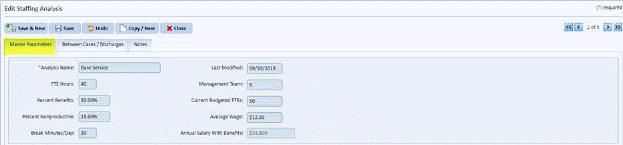
You can enter certain financial assumptions for the department in the Master Parameters tab to determine staffing. You can also enter many of the pieces of data you obtained from the reports here.
Below is the Master Parameters Tab:
Below is a list of the fields:
Analysis Name – This field is a unique filed that best describes the scenario you are building. Each Staffing Analysis created will be given a unique name (2008 Budget in this case).
FTE Hours – This field shows how many hours a regular employee in your department works in one week; this number is usually 40.
Percent Benefits and Percent Nonproductive – These fields are percentage figures that are readily available from your Human Resources department. Percent Benefits represents the additional costs over and above the basic payroll cost. For example, medical insurance and other related benefits usually add about 30% to the cost of maintaining one employee. This averages 14% to 16% in most of the facilities nationwide.
Break Minutes / Day – This field contains the number of break minutes, which the facility pays. (Lunch is usually excluded).
Last Modified – This field contains the date of when the staffing scenario was made or updated. This is very helpful in keeping track of changes and differentiating copies of data sets.
Management Team, Current Budgeted FTEs, and Average Wage – These fields contain figures that should also be readily available to you. Management Team is he number of salaried non-cleaning FTEs. Current Budgeted FTEs includes the entire department. Average Wage is for non-salaried employees.
Annual Salary With Benefits – This field contains a calculated figure from the previous fields.