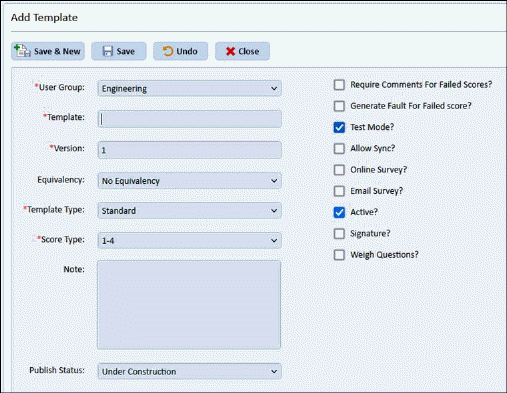
- Template settings like (template type, score type etc.) and questions can be modified.
- Version: User can enter template version e. g. 1, 2 etc. (Default Version 1)
- User can select user group while creating template.
- Equivalency: User can select No Equivalency or existing template from the list.
o No Equivalency: Newly created template is not based on any template.
o When a template with Equivalent template is published, user can Inactivate old equivalent template by selecting “Inactivate Previous Template” checkbox while publishing the template.
- Publish Status
o Under Construction (Default) - User can not publish under construction templates.
o Ready to release- By changing the status to ready to release, user is able to publish the template.
- Locations Tab
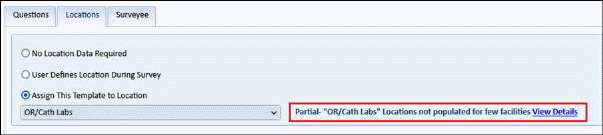
o Common and newly added Location list is populated.
o When user selects the location list, location list status is shown as in the above screenshot (Yes or No or Partial).
§ Populated – Yes: If locations are populated in all facilities for the selected list.
§ Populated – No: If locations are not populated in any of the facility for the selected list.
§ Populated – Partial: If locations are populated in some of the facilities for the selected list.
§ For Partial-
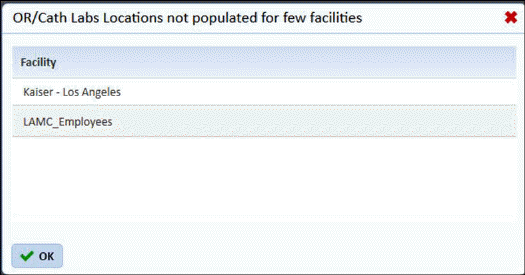
•When user clicks on Partial status following popup appears
•The popup shows all facilities where Location are not populated for the selected location list
- Surveyee Tab
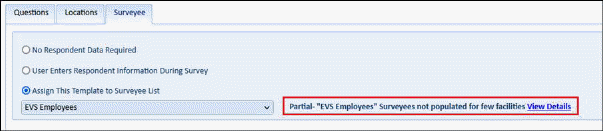
o Surveyee list dropdown shows Common and newly added surveyee lists (in registration)
o When user selects the surveyee list, surveyee list status is shown as in the above screenshot (Yes, No or Partial).
§ Populated – Yes: If surveyees are populated in all facilities for the selected list.
§ Populated – No: If surveyees are not populated in any of the facility for the selected list.
§ Populated – Partial: If surveyees are populated in some of the facilities for the selected list.
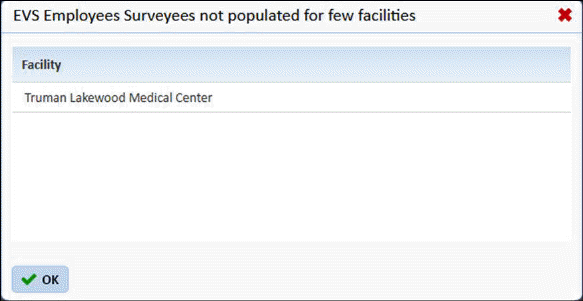
o When user clicks on Partial status following popup appears.
o The popup shows all facilities where surveyees are not populated for the selected Surveyee list
- Please note that template access is given to master user or to all users under a user group while publishing. Template access to individual user cannot be granted.
- When template is published its mode will be “Live” mode only.